How Pattern Recognition Has Significatn Weight on Learning New Skills
What do I mean by patter recogition
There are many ways that patterns show up in our world both from a human and non-human perspective. Learning to recognize this type of metadata has significant value in how it’s helped me understand new concepts in cybersecurity and IT.
Patterns have many different aliases depending upon the context we want to apply them. For humans we sometimes call these habits, behaviors, obsessions, compulsions. From a forensic perspective the term MO (Modus Operandi) applies. In coding we can look at subroutines and loops as a form of a pattern. IT and cyber use the terms “process” and “workflow”. When they are labeled as such, it’s rather simple to identify - something that is repeatable and predictable and typically yields persistently the same (or similar) results.
What overall pattern users fail at?
This can be interpreted in many ways but from an overarching perspective it comes down to human behaviors. This is in no way meant to sound denigrating but rather to capture and put a label on these behaviors in order to give them a relatable definition:
- General laziness
- Preference towards convenience vs thoroughness
- Impatience
- Breaking bad habits
These are just a few but we can of course name others. The list above tends to outline the more unfavorable or negative aspects of human patterns. Of course there are others which are beneficial such as a healthy circadian rhythm, proper dieting and regular exercise. But to better illustrate how hackers and threat actors have taken advantage of this let’s look at a historical example:
The evolution of browser security
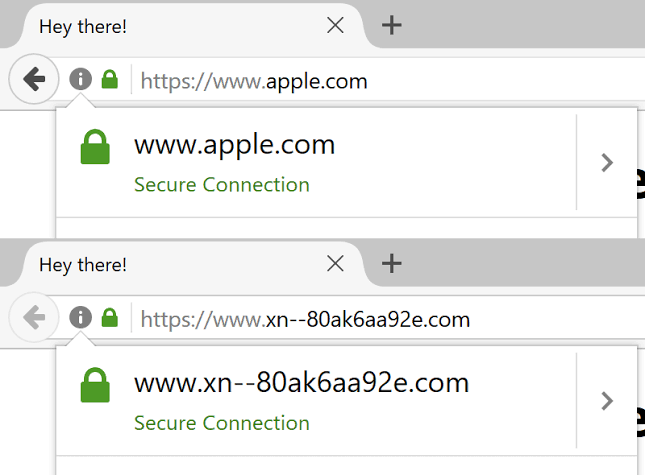
Let’s dial it back several years, right before we thought that SSL certificates were a thing. HTTP was the most common protocol for websites because, well, no one saw the need to encrypt a browser session. But once attackers realized banking sites and anything handling credentials or personal data were fair game, browser makers needed a way to signal “this connection is encrypted.” That’s where the padlock came from, baked into Netscape Navigator back in 1995 right alongside SSL itself. It wasn’t invented later as some fix for confused users, it was there from day one:
<claude: insert image of https lock symbol in use>
Except a lock icon alone doesn’t tell you who you’re actually talking to. Attackers could still throw up a self-signed cert, and unless you knew how to read one (nobody does), you’d have no idea you were on the wrong site. So the padlock got an upgrade: Extended Validation certs, which threw the company’s actual verified name into a green address bar starting around 2007. Feels like overkill now but at the time it was supposed to be the “yes this really is your bank” signal. Except that failed too. Turns out most people never noticed the green bar or understood what it meant, so by 2019 Chrome and everyone else quietly killed it off. OK so now what? Well this is where it gets interesting. In 2015 Let’s Encrypt started handing out free, automated certificates to anyone with a domain. Great for the web as a whole, everyone should be encrypted, but it also meant the last real cost of “looking legit” disappeared. Attackers didn’t need to break the lock anymore, they just needed a cheap lookalike domain and a free cert, and now their phishing page has the same padlock your bank does. By 2018 more than half of phishing sites had one.
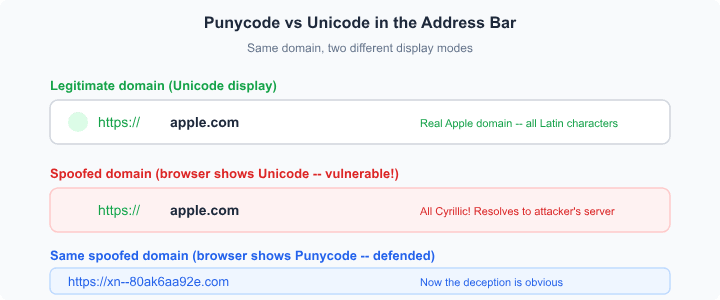
<claude: insert example of typosquatting>
That’s the pattern in a nutshell: teach people to look for one visual cue, and once attackers can copy it, seeing that same familiar cue over and over again is exactly what makes people comfortable enough to stop questioning it.
paypal.com vs paypa1.com rnicrosoft.com